If you manage accommodation programmes, you know the drill. A report needs updating, so you pull a spreadsheet, manually cross-check another one, rebuild a deck, and by the time it's ready, the conversation has moved on. Teams need instant clarity, flexibility, and the ability to make informed decisions quickly.
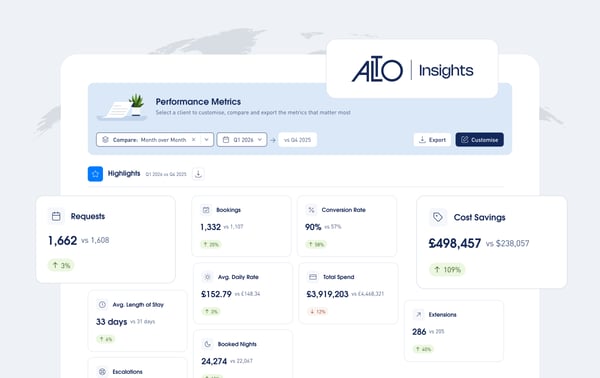
That’s why we built the Custom Dashboard within AltoInsights: a powerful new way to configure, analyse, and share accommodation performance insights in real time.
A Smarter Way to See Your Data
With the Custom Dashboard, everything comes together in one dynamic, client-specific view so you can access the insights you need right away and act on them faster.
Built in response to client feedback, Custom Dashboard reflects our commitment to listening to our users and giving them greater flexibility and control over their reporting.
The result is a more intuitive, efficient way to understand and communicate performance, without the manual overhead.
Now you have a single source of insight that delivers the right information at the right time, so you can focus on what matters most.
What Are The Key Benefits of the Custom Dashboard?
- Real-time visibility: Get a clear, real-time view of performance without waiting for reports
- Customised insights: Focus on the metrics that matter most to your role and business goals. Adapt insights easily for different audiences and conversations.
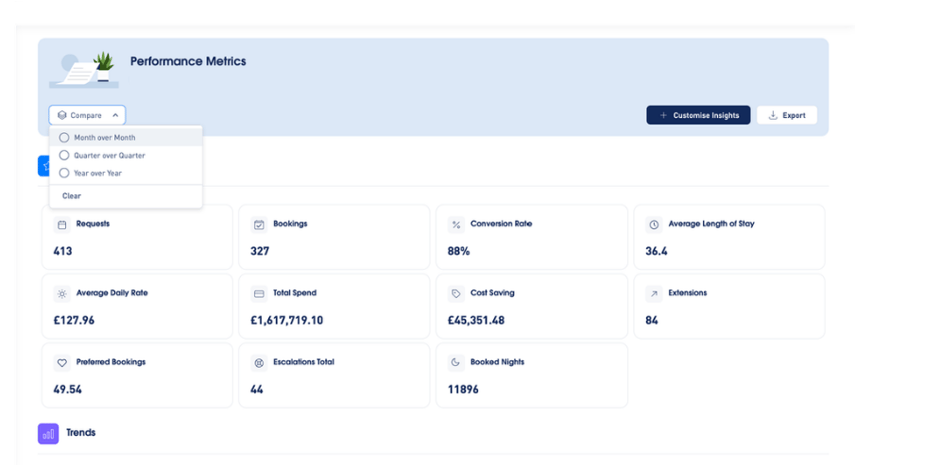
- Faster decision-making: Spot trends and changes quickly with built-in comparison views
- Easy sharing: Share professional, ready-to-use dashboards with stakeholders or export data and visuals instantly as PDF or Excel
- Reduced manual work: Move away from spreadsheets and repetitive reporting tasks
How it works
Getting started is simple!

- Sign in to AltoVerse and click on AltoInsights from the left-hand menu
- Click “Customise Insights” to the dashboard to your needs
- Add or adjust insights based on your priorities
- Save your dashboard for reporting or meetings
- Click the “Compare” button and select your timeframe (monthly, quarterly, yearly) to compare performance over time
- Export your dashboard as Excel or PDF when needed
Ready to try it yourself?
The Custom Dashboard is available to all AltoVita clients today!
Not a client yet? Get in touch see what AltoInsights can do for your programme!