Blog / News / Product Updates / Book Corporate Accommodation Directly from Your Inbox or Teams: Introducing the AltoVita Outlook and MS Teams App
News
Product Updates
Book Corporate Accommodation Directly from Your Inbox or Teams: Introducing the AltoVita Outlook and MS Teams App
What if you could book corporate accommodation, without ever leaving your inbox?
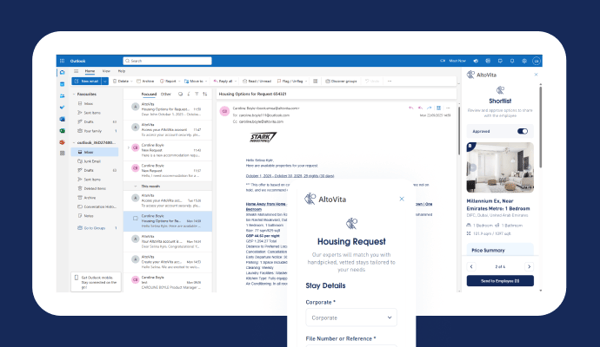
AltoVita’s Outlook Add-in and MS Teams App make this possible! Users can submit accommodation requests, review shortlisted property details, approve or reject options, and send selections to employees for final review, all directly from their email or from within Microsoft Teams.
AltoVita’s Outlook and Teams add-ins are designed to streamline corporate accommodation bookings, eliminating the “switching cost” of juggling multiple applications and letting users complete their day-to-day accommodation sourcing and booking tasks faster and more efficiently.
Originally presented during the Design Thinking Week and the WERC workshop at the Microsoft Seattle offices in April, the concept for the Outlook Add-in received overwhelmingly positive feedback from industry leaders, validating our vision and driving rapid development, leading to the big reveal at our 5th annual Smart, Safe and Sustainable Summit in London last summer. The idea took its next step forward, extending this same seamless experience into Microsoft Teams, so clients who live inside Teams, Outlook and the wider Microsoft 365 ecosystem all day never have to switch tabs to manage their corporate housing.
So, what can you actually do with the AltoVita Outlook and Gmail Add-ins?
Submit new accommodation requests
Submitting new accommodation requests through AltoVita is quick and effortless. Follow these simple steps:
- Open the Add-in: While in your inbox, open the AltoVita Add-in form from the side panel.
- Fill in Details: Enter all key information about the accommodation request (location, dates, number of bedrooms, budget, guest details)
- Send Request: Click the ‘Send Request’ button.
- Sit Back: Our Customer Success team will immediately start sourcing the best accommodation options for you.
Review and approve shortlisted properties
Once our Customer Success team has curated a shortlist of properties for you, you will receive an email from AltoVita.
But it’s no longer necessary to leave your inbox and review the options on AltoVita’s platform.
The Outlook Add-in sidebar lets you view all property comparison details, including images, so you can quickly and thoroughly review options without opening a separate browser.
You can approve or reject options directly using the toggle. When you’re ready, simply enter your employee’s email and click “Send to Employee” to share the final selection for their approval.
Book through VITA AI
Don’t feel like filling out a booking request form? Chat with VITA AI, our smart, AI-powered assistant.
Instead of entering every detail on the accommodation request form, simply tell VITA what you need. It’s just like sending an email to our booking team, but without the back-and-forth.
VITA understands natural language, asks for any missing details, and then submits your request directly to our Customer Success Team.
It’s fast, intuitive, and makes corporate accommodation booking as simple as chatting.
Manage bookings and analytics, right inside Teams
The AltoVita Teams App goes a step further, bringing the full AltoVerse experience directly into Microsoft Teams:
-
Bookings: view, filter, review booking details, and raise cancellations without leaving Teams.
-
AltoInsights: explore your organisation's accommodation analytics across five reporting tabs.
-
One-click Azure AD login: sign in automatically when your AltoVita email matches your Microsoft account — no separate credentials needed.
Who is AltoVita’s Outlook Add-in and Teams App for?
The AltoVita Outlook Add-in is free for all existing clients and is available for immediate download. It is Microsoft-certified and is compatible with both Outlook web and desktop apps.
The AltoVita Teams App is also available: search for "AltoVerse" in the Apps section of Microsoft Teams (or Outlook / Microsoft 365), click "Add," then sign in with Azure AD to get started.
Travel and mobility managers can submit, review, and approve accommodation booking requests directly from their inbox or MS Teams workspace, eliminating the “switching cost” of juggling multiple platforms. For professionals managing busy, multitasking roles, this reduces friction and saves valuable time.
In the world of mobility and business travel, accommodation is just one piece of the puzzle. By handling it seamlessly within your inbox, you can focus on the more complex and strategic aspects of your role.
Not an AltoVita client yet? Book a Demo to see the Outlook Add-in in action.